
Home & kitchen remodeling Google Ads
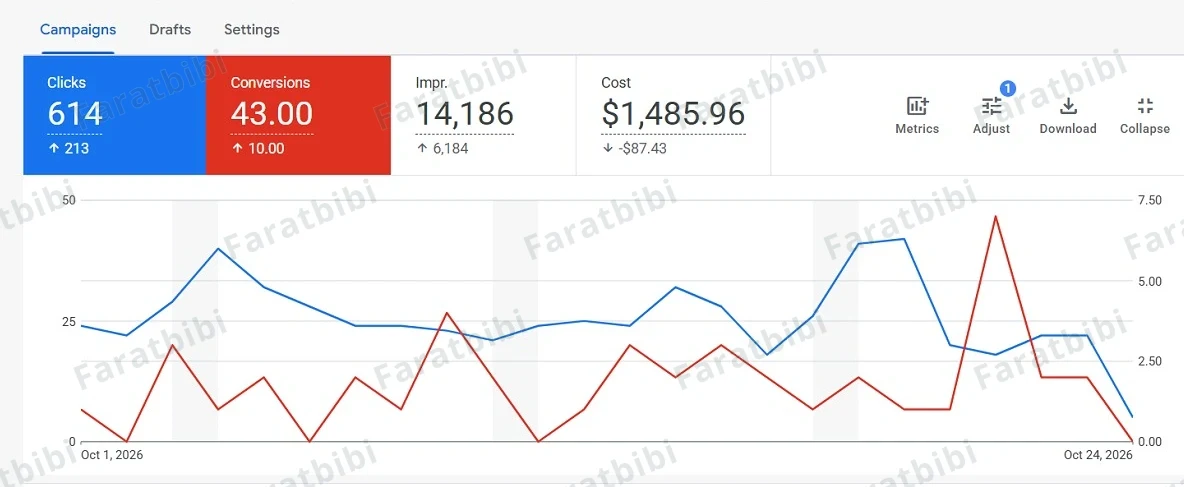
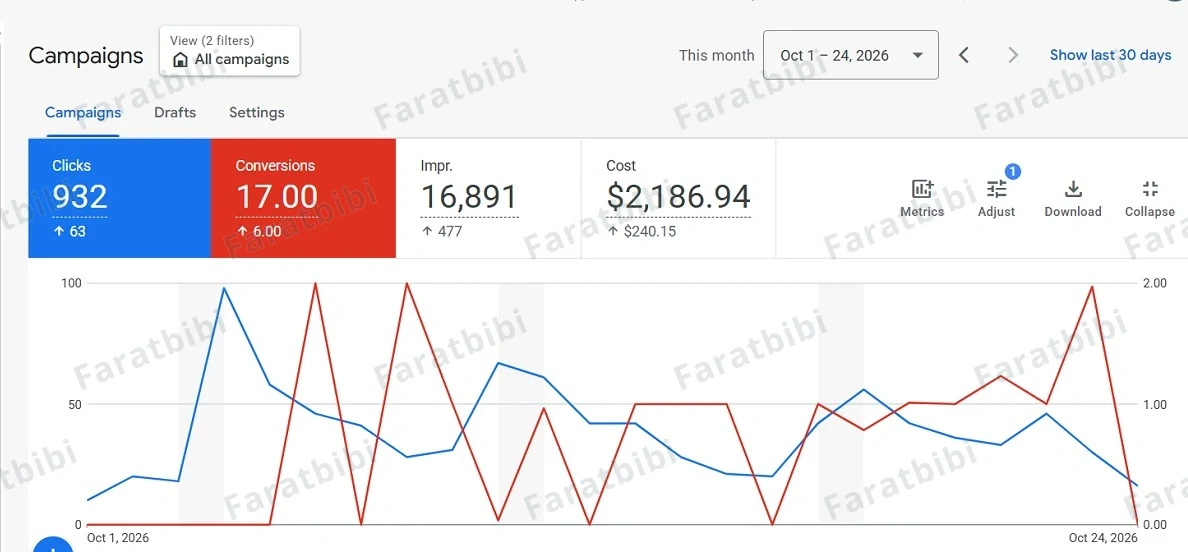
Both accounts gained conversions this month: 43 against 33, and 17 against 11.
Get a free account reviewThe Screenshots
Two Google Ads overviews, one from each remodeling account, both for Oct 1 to 24, 2026. Click or tap either image for the full-size version.
Account 1
 Open full size
Account 1, Oct 1 to 24, 2026: 614 clicks, 43.00 conversions, 14,186 impressions and $1,485.96 cost, as Google shows them. Against the 24 days before, clicks rose by 213, conversions by 10.00 and impressions by 6,184, while cost fell by $87.43. Dates as labeled along the bottom of Google's chart.
Account 2
 Open full size
Account 2, Oct 1 to 24, 2026: 932 clicks, 17.00 conversions, 16,891 impressions and $2,186.94 cost, as Google shows them. Against the 24 days before, all four arrows point up: clicks by 63, conversions by 6.00, impressions by 477 and cost by $240.15. Dates as set in Google's date picker.
The Figures Side by Side
| Period | Clicks | Conversions | Cost | Cost per conversion (calculated) | Conversion rate (calculated) |
|---|---|---|---|---|---|
| Account 1, Oct 1 to 24, 2026 | 614 | 43.00 | $1,485.96 | $34.56 | 7.00% |
| Account 1 (the 24 days before) | 401 | 33.00 | $1,573.39 | $47.68 | 8.23% |
| Account 2, Oct 1 to 24, 2026 | 932 | 17.00 | $2,186.94 | $128.64 | 1.82% |
| Account 2 (the 24 days before) | 869 | 11.00 | $1,946.79 | $176.98 | 1.27% |
Google's overview does not print the last two columns, so I divided cost by conversions and conversions by clicks, rounding to two decimals. Each row for the days before is the figure above it minus the change its arrow shows.
How I Run Remodeling Accounts
Homeowners usually compare a few remodelers before they choose one, so these habits cover the ad, the page and the follow-up.
- Each job type runs on its own. A full kitchen, a bathroom, a basement and an addition differ in size and price, so each gets its own campaign, budget, ads and landing page, kept apart from small repair searches. Searches for restaurant kitchens, TV makeover shows or wholesale supply are blocked as negative keywords.
- A radius your crew can drive. A big remodel can keep your crew at one house for weeks, so the target area follows the drive they can make every morning. Full kitchens and whole-home jobs aim at the heart of your service area, while smaller jobs run across a wider zone on a budget of their own.
- Every search is sorted by intent. Searches like "cost to remodel a kitchen" or "renovation financing" stay in, sent to pages with your price ranges or financing details. "Water damage repair" and "mold removal" are added as negative keywords if restoration is not work you take on.
- A quote form that qualifies. The form asks the easy things first: project type, timeline, a rough budget and whether the person owns the home, with contact details last. Above it, the page shows a starting price range you choose, so expectations line up before the first call.
- Finished work, license and permits up front. Each ad lands on the page for that project, with photos of finished work, what was done and how long it took, plus your license number, insurance and permit process near the top. Cabinets and appliances take weeks to arrive, so in late summer the page says whether a kitchen booked now can be ready for the holidays.
- Only real conversations and genuine forms count. A call counts only when it lasts long enough to be a real conversation, and a quote form only after it passes checks such as required project fields. Big projects are rarely decided in a day, so I check Google's days-to-conversion data before setting how long a click can still count, and signed contracts go back into Google Ads with their value where your CRM can send them.
What the Numbers Say
Account 1 recorded 43 conversions from Oct 1 to 24, 2026, against 33 in the 24 days before, a 30.30% rise, while spend fell 5.56%. Each conversion cost $34.56 ($1,485.96 ÷ 43), down from $47.68 ($1,573.39 ÷ 33).
Account 2 turns fewer of its clicks into conversions, so each one costs more: 17 conversions at $128.64 each ($2,186.94 ÷ 17). That is still up from 11 at $176.98 ($1,946.79 ÷ 11) in the 24 days before, on 12.34% more spend.
Clicks rose in both accounts, by 53.12% in Account 1 and 7.25% in Account 2. The two accounts may count different actions as conversions, so I read each one against its own earlier days, not against the other.
A conversion here is whatever each account was set to count, for example a call or a quote form. Google shows decimals when it shares credit between ads.
Who This Is For
If It's Your Business
If you remodel kitchens, baths or whole homes, the free review starts with which kinds of projects your budget is buying today, and whether a big-project inquiry and a small repair call count as the same thing. What happens after that is up to you.
If It's Your Client's Account
For a remodeler on your client list, I can manage the Google Ads account for you, white-label. Kitchen, bath, basement and addition campaigns report on their own, so your client sees which kind of project each conversion came from.
Let's Look at Your Remodeling Ads
Tell me which jobs you want more of, whether kitchens, baths or whole-home projects, and I'll review your account, or your client's, for free.
Other Industries
- Senior living: the largest account recorded 317 conversions from Oct 1 to 24, at $11.19 each.
- Real estate: one account rose from 30.35 to 39.31 conversions in 30 days, while the larger one had a harder October.
- Driving instructors: one account doubled its conversions this month, from 17 to 34.